Project overview
Compare total estimated, total actual cost, total billed and real profit across projects.

Construction job costing
ActualCost connects the estimate, the work performed, outside costs and billings to the project and job where they belong.
An estimate is the starting plan, not the final result. Quantities change, labour takes a different amount of time, subcontractors replace internal workers and billing happens in stages. ActualCost keeps the original estimate visible while actual costs and billed amounts accumulate.
Real profit = total billed − total actual cost
Total actual cost combines recorded labour, materials and subcontractors. If no billing has been recorded, ActualCost does not present an invented profit result.
Compare total estimated, total actual cost, total billed and real profit across projects.
Trace each result back to the specific piece of work that created it.
Monitor remaining labour, material and subcontractor allowances, with optional red and green signals.
Show, hide and arrange the columns that matter to each company’s workflow.
ActualCost is intended to answer a practical question while a project is still moving: which job needs attention now? It makes completed and untouched jobs distinguishable from work that is already accumulating expenses.
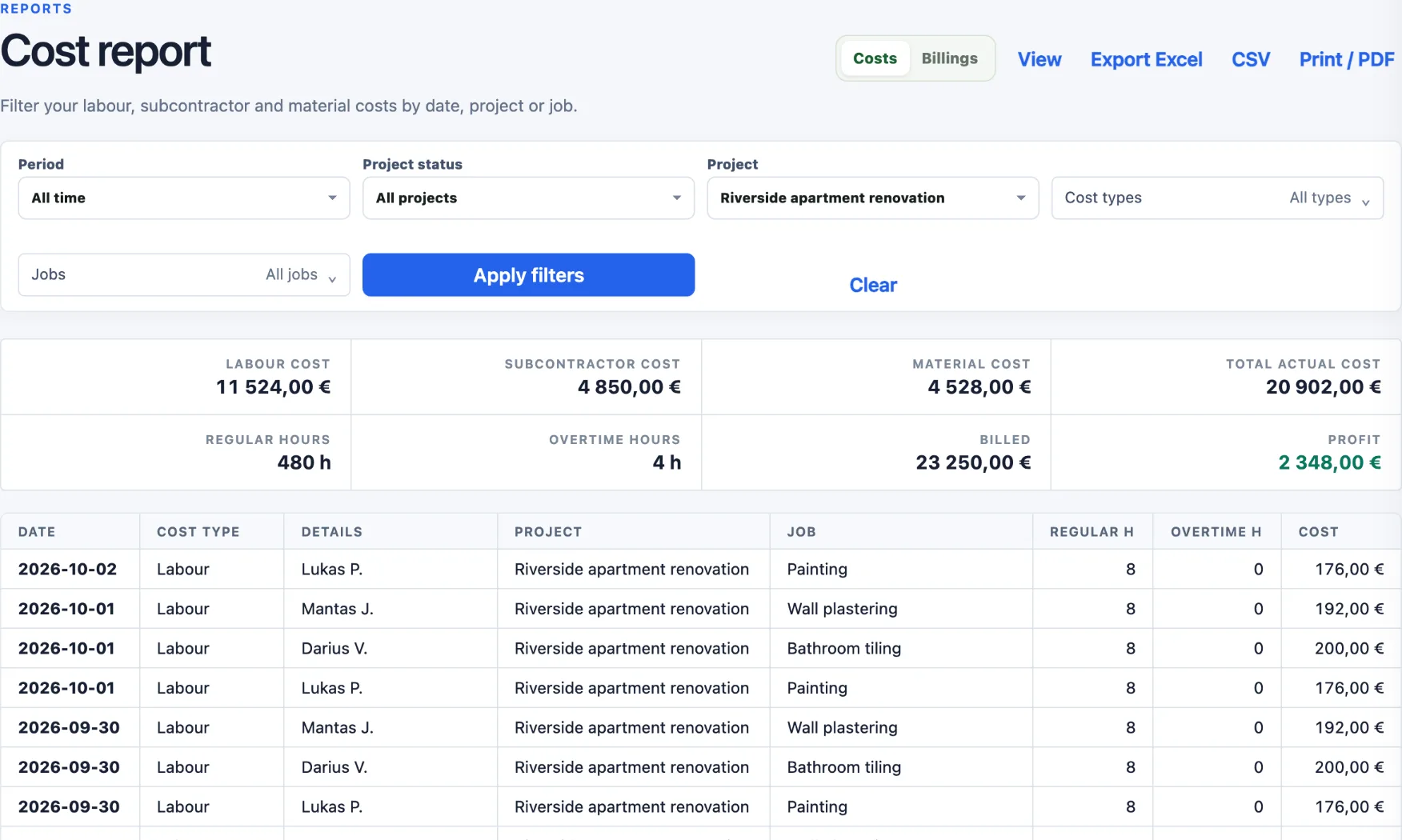
Take a demo apartment renovation estimated at 28 000 €. Five weeks in, the team has logged 484 hours, materials have been bought, two subcontractors have been paid and two acts have been billed.
| Amount | |
|---|---|
| Estimated (labour + materials + subcontractors) | 28 000,00 € |
| Billed so far | 23 250,00 € |
| Actual cost so far | 20 902,00 € |
| Real profit so far | +2 348,00 € |
The project as a whole looks healthy. The job list tells the more useful story: Wall plastering was estimated at 4 800 € of labour but has already used 5 924 € — 1 124 € over, and the work is not finished. Bathroom tiling and painting are within their budgets. Without job-level costs, that overrun would stay hidden inside a profitable project total until the final account.
New: estimates in ActualCost (early access) — build the estimate from jobs and rows with norms and your own additions. Turning an approved estimate into a project with its job budgets is coming next.
Job costing means tracking the real cost of each piece of work — labour, materials and subcontractors — and comparing it with that work’s estimate and billed value while the project is still running. It shows which jobs make money and which lose it. Read more in What is construction job costing?
Accounting software records invoices, payments and taxes for the whole company. ActualCost attaches each cost to a project and a job and compares it with the estimate and with what has been billed. It works alongside your accounting; it does not replace it.
No. You can start with a few jobs per project and add or split them later. Extra work that was not in the estimate can be added as a new job while hours are being recorded, so it is tracked from the first day.
Real profit appears once billing is recorded for the project or job: total billed minus total actual cost. Before any billing exists, ActualCost shows budget left instead of an invented profit figure.
Yes. Cost and billing reports can be filtered by period, project, job and cost type, and exported to Excel or CSV or printed as a PDF.
Apply for early access to ActualCost.