
Early access. Estimates are being switched on for pilot companies first. Available now: estimate projects, jobs with labour, material and subcontractor rows, norms, your own additions and VAT. Coming next: your own job library, printable estimates for clients, and approving an estimate into a project with its job budgets.
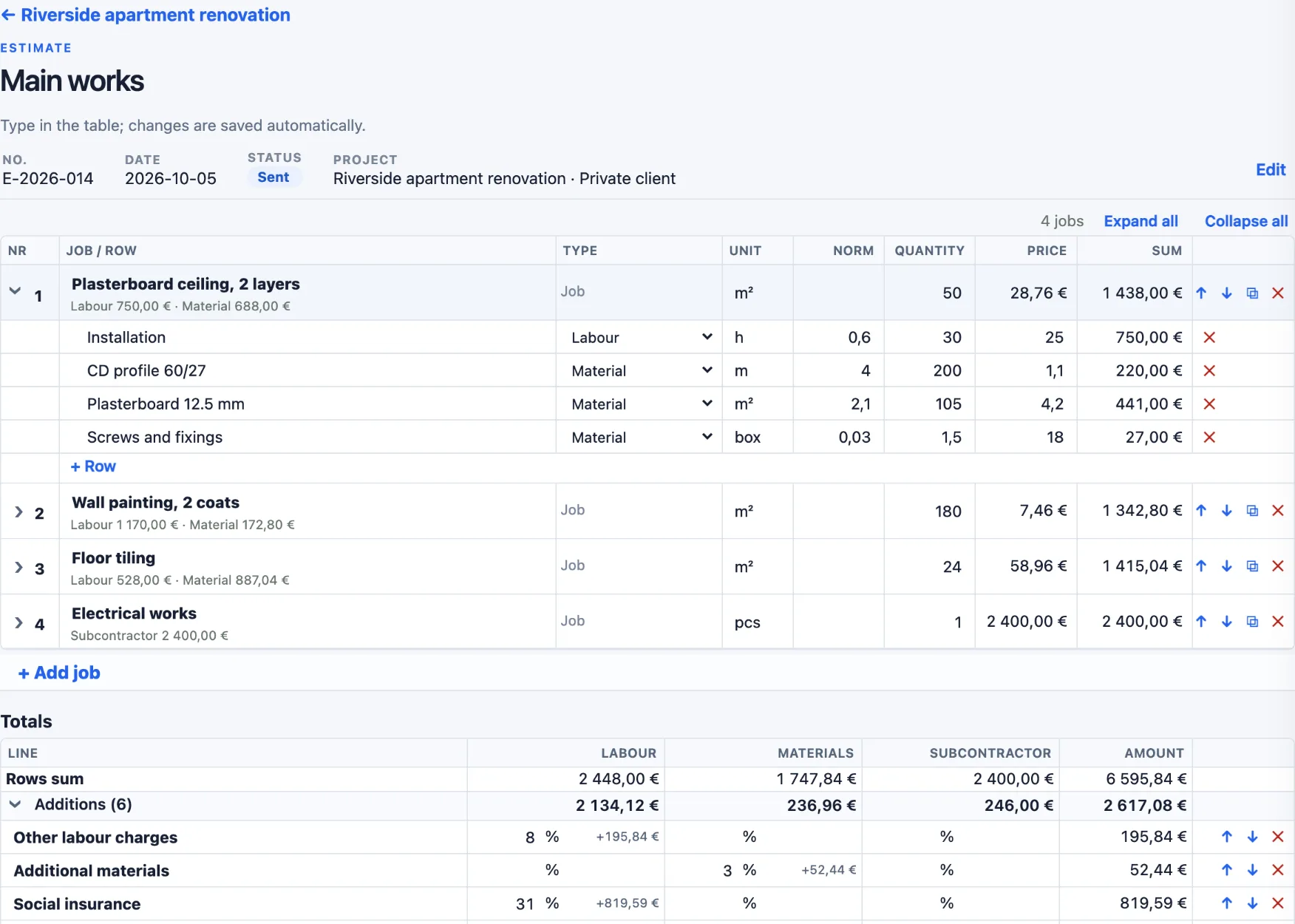
Jobs and their rows
An estimate is a list of jobs — for example Plasterboard ceiling, 50 m². Under each job are its rows: labour, material or subcontractor, each with a unit, a norm per unit of the job, a quantity and a price. The job shows its price per unit, its sum and how much of it is labour, materials and subcontractors.
Norms that scale with the quantity
Type the job quantity once; every row follows its norm. The same ceiling at 50 m² and at 100 m²:
| Row (norm per m²) | 50 m² | 100 m² |
|---|---|---|
| Installation (0,6 h) | 30 h | 60 h |
| CD profile 60/27 (4 m) | 200 m | 400 m |
| Plasterboard 12.5 mm (2,1 m²) | 105 m² | 210 m² |
| Screws and fixings (0,03 box) | 1,5 box | 3 box |
| Job sum | 1 438,00 € | 2 876,00 € |
| Price per m² | 28,76 € | 28,76 € |
Your own additions
Every company prices differently, so the additions are yours: a list of percentages for labour, materials and subcontractors — for example other labour charges, social insurance, site costs, overhead and profit. Each line is added to the running total of its types, top to bottom, and the total updates while you type.
| Demo estimate (4 jobs) | Amount |
|---|---|
| Rows sum | 6 595,84 € |
| Additions (6 lines: 8 %, 3 %, 31 %, 5 %, 20 %, 5 %) | +2 617,08 € |
| Total excl. VAT | 9 212,92 € |
| VAT 21 % | 1 934,71 € |
| Total incl. VAT | 11 147,63 € |
Made for long estimates
- Fold jobs to one line. Open only the job you work on; Expand all or Collapse all in one click.
- Spreadsheet speed. Click a cell and type; Enter moves to the next row. Changes are saved automatically.
- Reuse. Duplicate a job or a whole estimate (for example an option B), and move jobs up or down.
- Status. Keep estimate projects open, won or lost, and estimates draft, sent or declined — lost work stays for reference.
From estimate to job costing (coming next)
When the client approves, the estimate will become a project with its jobs and their labour, material and subcontractor budgets — including your additions, without VAT. From then on, ActualCost compares those budgets with the real costs as they come in. See job costing and budget versus actual.
Frequently asked questions
Does this replace an estimating program?
ActualCost estimates cover the everyday work of a small contractor: jobs, labour, material and subcontractor rows with norms, your own additions and VAT. There is no national price database: you use your own prices, and soon your own library of jobs.
What is a norm?
A norm is how much of something one unit of the job needs — for example 4 m of CD profile per m² of ceiling. Change the job quantity and every row follows. You can type either the norm or the row quantity; the other is calculated.
How are the additions calculated?
Each addition adds its % to the running total of the types you choose (labour, materials, subcontractors), in order from top to bottom. Your company keeps its own default list, and you can change it in every estimate.
Is VAT part of the job budgets?
No. VAT is shown on the estimate, but ActualCost compares costs without VAT. When an estimate is approved (coming next), the job budgets include the additions but not VAT.
Who can change an estimate?
Owners, administrators and managers can create and change estimates. Other users of your company can view them.
How do I get estimates?
Estimates are in early access and are being switched on for pilot companies first. Apply for access or write to info@actualcost.eu.
Price it right, then see if it was right.
Apply for early access to ActualCost.